Create tools to reduce repetitive work.
I have bumped into a work phase where I’m now repeatedly doing the same steps by hand: copy this file to a new location, edit this other file by adding some parameters at the end, and then editing lines, and adding lines in another file, then running a command.
This works when it’s infrequent, and you’re still modifying things as you learn. It becomes a pain, when you find you’re doing it more frequently. I’ve also noticed a number of times when it finishes that I’d forgotten a step, so had to go back and fix that part, then redo the other parts.
It is time to write the script to pull the steps together. As mentioned, I’m working slower at the moment, so this seems like a good step to take: less writing, and more thinking, followed by looking up more things.
The balance here is to spend only ‘enough’ time to make it worthwhile with time saved. You can judge that using the relevant XKCD illustration on ‘Is it worth the time’:
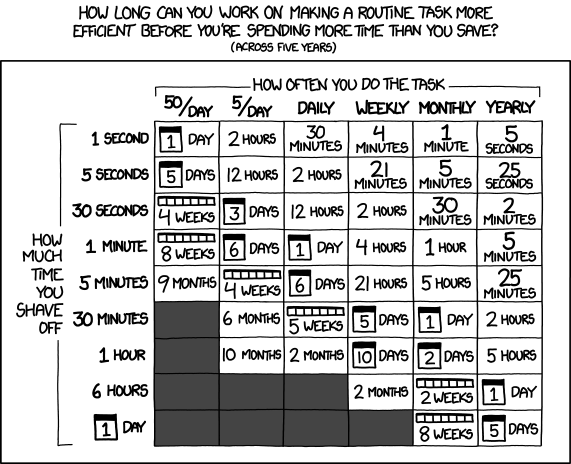
You’ll note we have two goals here: code as a checklist so steps are remembered, and speed of execution. Time saving is nice, but possibly not the main goal for now. My main goal at the moment is better execution.
Later speed increases when this step is rolled into a CI/CD path for development. But that’s less important now.
Just start and add more as needed
Start with a simple step, and let it grow organically as you see the steps unfold. Consider if this is a script or compiled file.
Add try and catch blocks to confirm steps and report progress.
Determine where and how you include secret variables into the script too.
Break it up with methods as steps so it’s easier to manage.
Make it safe to fail as you develop and later run too.
Discuss what you’re doing with team members too, and think about how you can improve it over time.
It’s taken me longer to do the final steps than I thought. Finding the ideal algorithm to manipulate text to replace one line, but not another instance is challenging. Combine with one hand typing, and it slows right down.
This post is part of a project pulling together my materials and ideas about Teaching Team Collaboration: the Human-Side of Software Development for software development to students.
If you’d like to be notified of future posts, then please sign up for more using the adjacent form. When you sign up, then I’ll send you a free copy of the collaboration rules as a PDF from the book. You can also follow me on LinkedIn
The ideas above are from my book 101+ Ideas to Improve Team Collaboration, which covers all of these little things that students can do to improve their collaboration. Also available via Kindle.